Identify Gadget Configurations
Zephyr Squad stores gadget configurations in Jira as entity properties. You can use the following script to download these configurations. The script retrieves configurations for all Jira dashboards, including every Zephyr Squad gadget within each dashboard.
This page contains the following:
Note
Due to Atlassian Forge platform regulations, you need to reconfigure Zephyr Squad gadgets in Jira dashboards. You can use the given scripts to retrieve saved configurations and reconfigure them.
NodesJS Script
#!/usr/bin/env node

// ── Configuration ─────────────────────────────────────────────────────────────
const JIRA_BASE_URL  = 'https://your-instance.atlassian.net'; // e.g. https://mycompany.atlassian.net
const JIRA_EMAIL     = 'your-email@example.com';              // Atlassian account email
const JIRA_API_TOKEN = 'your-api-token-here';                 // Atlassian API token. Generate from here - https://id.atlassian.com/manage-profile/security/api-tokens
const OUTPUT_FILE    = 'gadget-configs.csv';
const SQUAD_ADDON_KEY = 'com.thed.zephyr.je';                 // Only export gadgets belonging to the Zephyr Squad add-on
// ─────────────────────────────────────────────────────────────────────────────

const https  = require('https');
const http   = require('http');
const fs     = require('fs');
const path   = require('path');
const { URL } = require('url');

const AUTH_HEADER = 'Basic ' + Buffer.from(`${JIRA_EMAIL}:${JIRA_API_TOKEN}`).toString('base64');

function request(urlStr) {
  return new Promise((resolve, reject) => {
    const parsed = new URL(urlStr);
    const lib    = parsed.protocol === 'https:' ? https : http;

    const options = {
      hostname: parsed.hostname,
      port:     parsed.port || (parsed.protocol === 'https:' ? 443 : 80),
      path:     parsed.pathname + parsed.search,
      method:   'GET',
      headers: {
        'Authorization': AUTH_HEADER,
        'Accept':        'application/json',
      },
    };

    const req = lib.request(options, (res) => {
      let body = '';
      res.on('data', chunk => (body += chunk));
      res.on('end', () => {
        if (res.statusCode === 404) {
          resolve(null); // treat 404 as "not found", not a fatal error
          return;
        }
        if (res.statusCode < 200 || res.statusCode >= 300) {
          reject(new Error(`HTTP ${res.statusCode} for ${urlStr}\n${body}`));
          return;
        }
        try {
          resolve(JSON.parse(body));
        } catch (e) {
          reject(new Error(`JSON parse error for ${urlStr}: ${e.message}`));
        }
      });
    });

    req.on('error', reject);
    req.end();
  });
}

// Escape a CSV cell value
function csvCell(value) {
  if (value === null || value === undefined) return '';
  const str = String(value);
  // Wrap in quotes if it contains comma, newline, or double-quote
  if (str.includes(',') || str.includes('\n') || str.includes('"')) {
    return '"' + str.replace(/"/g, '""') + '"';
  }
  return str;
}

function csvRow(...cells) {
  return cells.map(csvCell).join(',');
}

async function fetchAllDashboards() {
  const dashboards = [];
  let startAt = 0;
  const maxResults = 50;

  while (true) {
    const url  = `${JIRA_BASE_URL}/rest/api/3/dashboard?startAt=${startAt}&maxResults=${maxResults}`;
    const data = await request(url);

    if (!data || !data.dashboards || data.dashboards.length === 0) break;

    dashboards.push(...data.dashboards);
    console.log(`  Fetched ${dashboards.length} dashboards so far...`);

    if (dashboards.length >= data.total) break;
    startAt += data.dashboards.length;
  }

  return dashboards;
}

async function fetchGadgets(dashboardId) {
  const url  = `${JIRA_BASE_URL}/rest/api/3/dashboard/${dashboardId}/gadget`;
  const data = await request(url);
  return (data && data.gadgets) ? data.gadgets : [];
}

function extractValue(data) {
  if (!data || !data.value) return null;
  return typeof data.value === 'object' ? JSON.stringify(data.value) : String(data.value);
}

async function fetchGadgetConfig(dashboardId, gadgetId) {
  const base = `${JIRA_BASE_URL}/rest/api/3/dashboard/${dashboardId}/items/${gadgetId}/properties`;

  // 1. Try "config"
  let data = await request(`${base}/config`);
  if (data && data.value) return { propertyName: 'config', value: extractValue(data) };

  // 2. Try "itemkey"
  data = await request(`${base}/itemkey`);
  if (data && data.value) return { propertyName: 'itemkey', value: extractValue(data) };

  // 3. List all property keys and try the first one found
  const list = await request(`${base}/`);
  const keys = (list && list.keys) ? list.keys : [];
  for (const entry of keys) {
    const key = typeof entry === 'object' ? entry.key : entry;
    if (!key) continue;
    data = await request(`${base}/${key}`);
    if (data && data.value) return { propertyName: key, value: extractValue(data) };
  }

  return { propertyName: null, value: null };
}

async function main() {
  console.log(`Connecting to: ${JIRA_BASE_URL}`);
  console.log('Fetching dashboards...');

  const dashboards = await fetchAllDashboards();
  console.log(`Total dashboards found: ${dashboards.length}\n`);

  const rows = [
    csvRow('Dashboard Name', 'Dashboard ID', 'Gadget Name', 'Gadget Title', 'Gadget ID', 'Property Name', 'Configuration'),
  ];

  for (const dashboard of dashboards) {
    const dashName = dashboard.name;
    const dashId   = dashboard.id;
    console.log(`Dashboard: "${dashName}" (${dashId})`);

    let gadgets;
    try {
      gadgets = await fetchGadgets(dashId);
    } catch (err) {
      console.warn(`  Warning: could not fetch gadgets — ${err.message}`);
      gadgets = [];
    }

    const squadGadgets = gadgets.filter(g => (g.moduleKey || '').includes(SQUAD_ADDON_KEY));
    console.log(`  Gadgets: ${gadgets.length} total, ${squadGadgets.length} Squad`);

    if (squadGadgets.length === 0) continue;

    for (const gadget of squadGadgets) {
      const moduleKey   = gadget.moduleKey || '';
      const gadgetName  = moduleKey.includes('__') ? moduleKey.split('__').pop() : moduleKey;
      const gadgetTitle = gadget.title || '';
      const gadgetId    = gadget.id;

      let propertyName = null;
      let config       = null;
      try {
        ({ propertyName, value: config } = await fetchGadgetConfig(dashId, gadgetId));
      } catch (err) {
        console.warn(`    Warning: could not fetch config for gadget ${gadgetId} — ${err.message}`);
      }

      rows.push(csvRow(dashName, dashId, gadgetName, gadgetTitle, gadgetId, propertyName, config));
      console.log(`    Gadget "${gadgetTitle}" (${gadgetId}) — property: ${propertyName || 'none'}`);
    }
  }

  const outputPath = path.resolve(OUTPUT_FILE);
  fs.writeFileSync(outputPath, rows.join('\n') + '\n', 'utf8');
  console.log(`\nDone. CSV written to: ${outputPath}`);
  console.log(`Total rows (excluding header): ${rows.length - 1}`);
}

main().catch(err => {
  console.error('Fatal error:', err.message);
  process.exit(1);
});
Runtime: Node.js v12+
Dependencies: none (uses built-in modules only)
Input: Edit the three constants at the top of the file before running:
JIRA_BASE_URL: Your Jira instance URL (For example, https://mycompany.atlassian.net)
JIRA_EMAIL: Your Atlassian account email
JIRA_API_TOKEN: Your Atlassian API token (generate at https://id.atlassian.com/manage-profile/security/api-tokens)
Run: node export-gadget-configs.js
Output: gadget-configs.csv

Python Script
#!/usr/bin/env python3

# ── Configuration ─────────────────────────────────────────────────────────────
JIRA_BASE_URL  = 'https://your-instance.atlassian.net'  # e.g. https://mycompany.atlassian.net
JIRA_EMAIL     = 'your-email@example.com'               # Atlassian account email
JIRA_API_TOKEN = 'your-api-token-here'                  # Atlassian API token. Generate from here - https://id.atlassian.com/manage-profile/security/api-tokens
OUTPUT_FILE    = 'gadget-configs.csv'
SQUAD_ADDON_KEY = 'com.thed.zephyr.je'                  # Only export gadgets belonging to the Zephyr Squad add-on
# ─────────────────────────────────────────────────────────────────────────────

import csv
import json
import sys
import urllib.request
import urllib.error
from base64 import b64encode

AUTH_HEADER = 'Basic ' + b64encode(f'{JIRA_EMAIL}:{JIRA_API_TOKEN}'.encode()).decode()


def request(url):
    """Fetch a URL and return parsed JSON, or None on 404."""
    req = urllib.request.Request(
        url,
        headers={'Authorization': AUTH_HEADER, 'Accept': 'application/json'},
    )
    try:
        with urllib.request.urlopen(req) as resp:
            return json.loads(resp.read().decode())
    except urllib.error.HTTPError as e:
        if e.code == 404:
            return None
        raise RuntimeError(f'HTTP {e.code} for {url}\n{e.read().decode()}') from e


def fetch_all_dashboards():
    dashboards = []
    start_at   = 0
    max_results = 50

    while True:
        url  = f'{JIRA_BASE_URL}/rest/api/3/dashboard?startAt={start_at}&maxResults={max_results}'
        data = request(url)

        if not data or not data.get('dashboards'):
            break

        dashboards.extend(data['dashboards'])
        print(f'  Fetched {len(dashboards)} dashboards so far...')

        if len(dashboards) >= data.get('total', 0):
            break
        start_at += len(data['dashboards'])

    return dashboards


def fetch_gadgets(dashboard_id):
    url  = f'{JIRA_BASE_URL}/rest/api/3/dashboard/{dashboard_id}/gadget'
    data = request(url)
    return data.get('gadgets', []) if data else []


def extract_value(data):
    if not data or 'value' not in data:
        return None
    value = data['value']
    return json.dumps(value) if isinstance(value, (dict, list)) else str(value)


def fetch_gadget_config(dashboard_id, gadget_id):
    base = f'{JIRA_BASE_URL}/rest/api/3/dashboard/{dashboard_id}/items/{gadget_id}/properties'

    # 1. Try "config"
    data = request(f'{base}/config')
    if data and data.get('value') is not None:
        return 'config', extract_value(data)

    # 2. Try "itemkey"
    data = request(f'{base}/itemkey')
    if data and data.get('value') is not None:
        return 'itemkey', extract_value(data)

    # 3. List all property keys and try the first one found
    listing = request(f'{base}/')
    keys = listing.get('keys', []) if listing else []
    for entry in keys:
        key = entry.get('key') if isinstance(entry, dict) else entry
        if not key:
            continue
        data = request(f'{base}/{key}')
        if data and data.get('value') is not None:
            return key, extract_value(data)

    return None, None


def main():
    print(f'Connecting to: {JIRA_BASE_URL}')
    print('Fetching dashboards...')

    dashboards = fetch_all_dashboards()
    print(f'Total dashboards found: {len(dashboards)}\n')

    with open(OUTPUT_FILE, 'w', newline='', encoding='utf-8') as csvfile:
        writer = csv.writer(csvfile)
        writer.writerow(['Dashboard Name', 'Dashboard ID', 'Gadget Name', 'Gadget Title', 'Gadget ID', 'Property Name', 'Configuration'])

        total_rows = 0

        for dashboard in dashboards:
            dash_name = dashboard.get('name', '')
            dash_id   = dashboard.get('id', '')
            print(f'Dashboard: "{dash_name}" ({dash_id})')

            try:
                gadgets = fetch_gadgets(dash_id)
            except RuntimeError as err:
                print(f'  Warning: could not fetch gadgets — {err}', file=sys.stderr)
                gadgets = []

            squad_gadgets = [g for g in gadgets if SQUAD_ADDON_KEY in (g.get('moduleKey') or '')]
            print(f'  Gadgets: {len(gadgets)} total, {len(squad_gadgets)} Squad')

            if not squad_gadgets:
                continue

            for gadget in squad_gadgets:
                module_key   = gadget.get('moduleKey') or ''
                gadget_name  = module_key.split('__')[-1] if '__' in module_key else module_key
                gadget_title = gadget.get('title') or ''
                gadget_id    = gadget.get('id', '')

                property_name = None
                config        = None
                try:
                    property_name, config = fetch_gadget_config(dash_id, gadget_id)
                except RuntimeError as err:
                    print(f'    Warning: could not fetch config for gadget {gadget_id} — {err}', file=sys.stderr)

                writer.writerow([dash_name, dash_id, gadget_name, gadget_title, gadget_id, property_name or '', config or ''])
                total_rows += 1
                print(f'    Gadget "{gadget_title}" ({gadget_id}) — property: {property_name or "none"}')

    print(f'\nDone. CSV written to: {OUTPUT_FILE}')
    print(f'Total rows (excluding header): {total_rows}')


if __name__ == '__main__':
    try:
        main()
    except Exception as err:
        print(f'Fatal error: {err}', file=sys.stderr)
        sys.exit(1)
Runtime: Python 3.x
Dependencies: none (uses built-in modules only)
Input: Edit the three constants at the top of the file before running:
JIRA_BASE_URL: Your Jira instance URL (For example, https://mycompany.atlassian.net)
JIRA_EMAIL: Your Atlassian account email
JIRA_API_TOKEN: Your Atlassian API token (generate at https://id.atlassian.com/manage-profile/security/api-tokens)
Run: python3 export-gadget-configs.py
Output: gadget-configs.csv
Alternative
Alternatively, you can also utilize Jira’s entity property tool to fetch the configurations:
Install the free Atlassian plugin - Entity Property Tool for Jira.
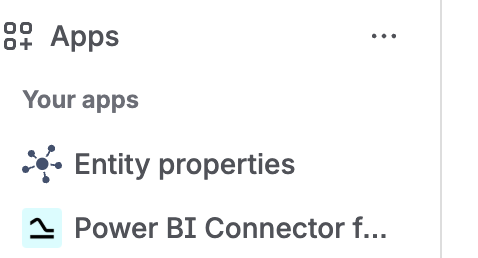
Once it is installed, it will appear under the Apps section.
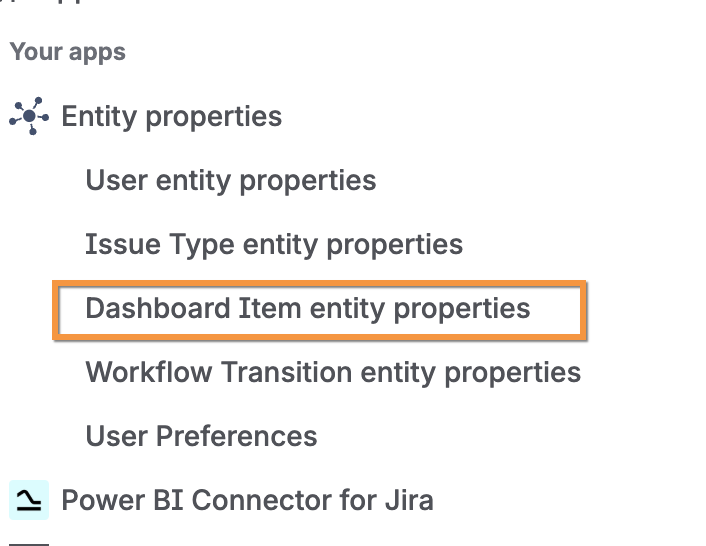
Expand the Entity properties app and navigate to the Dashboard Item entity properties option.
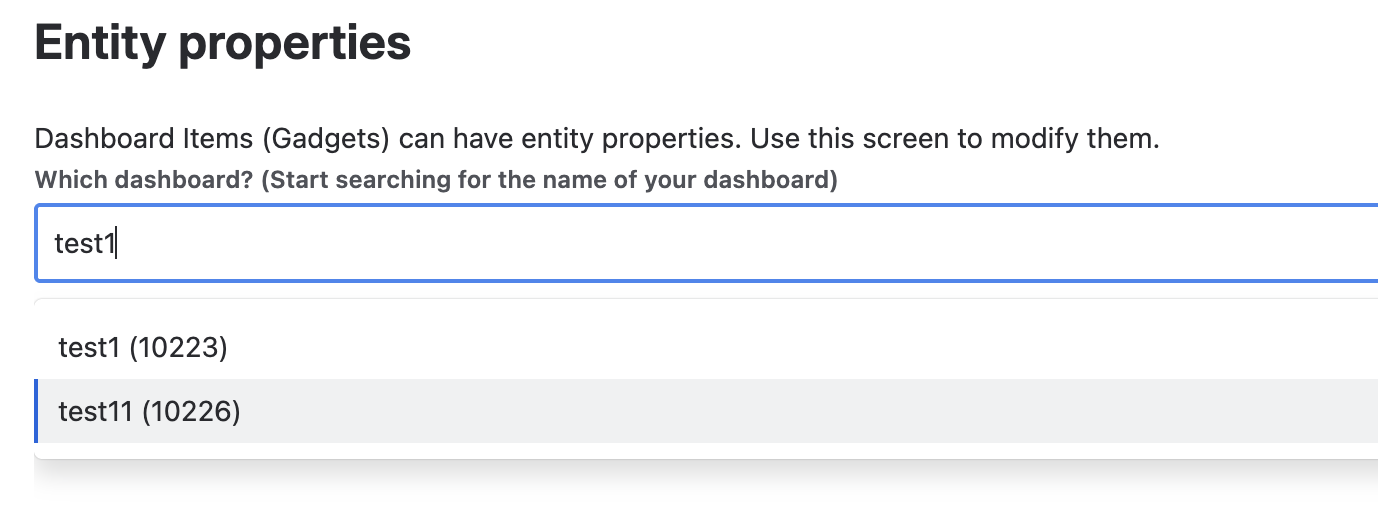
Type the name of the Jira dashboard and select it.
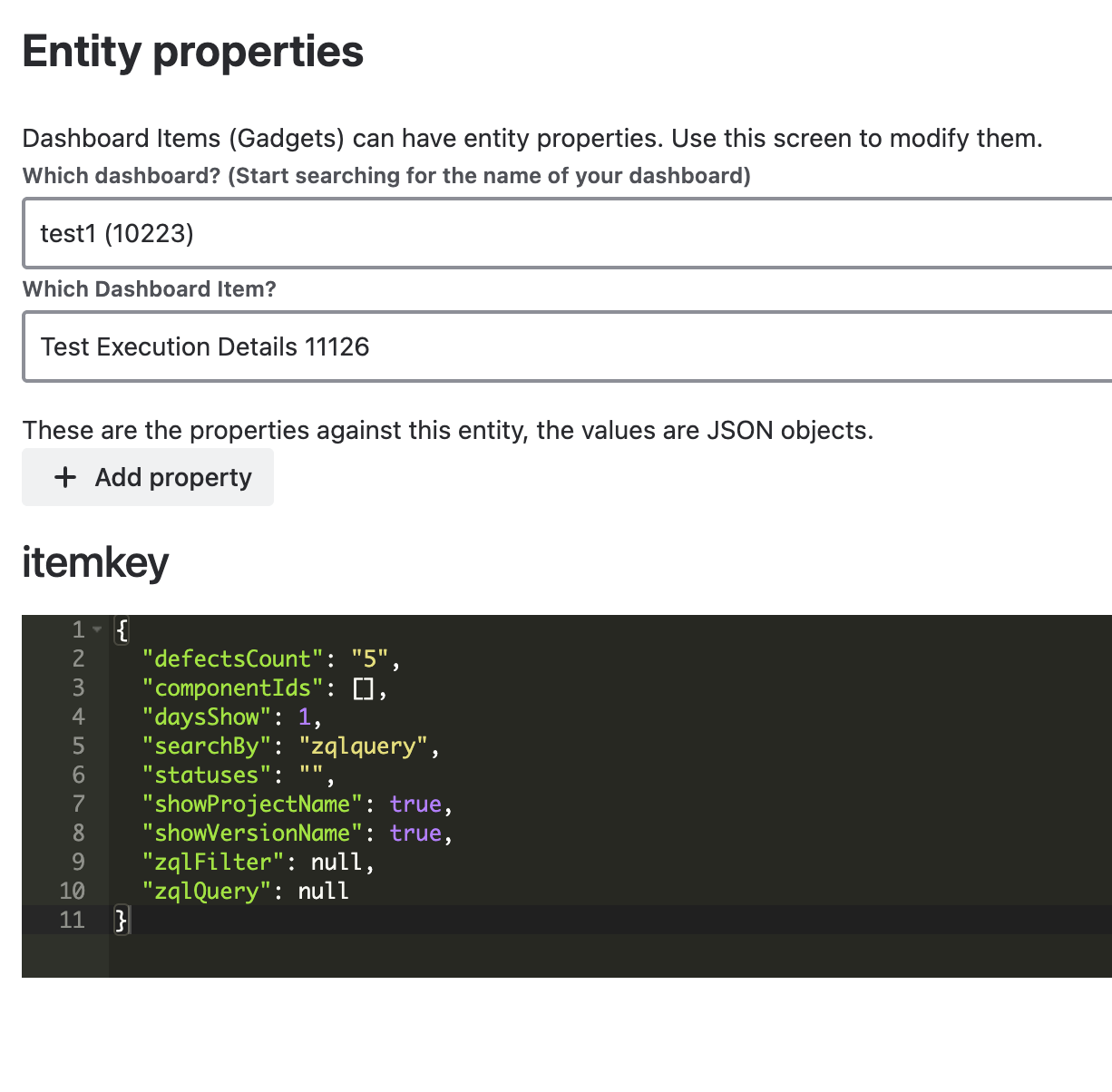
After selecting the gadget, you can view its saved properties.